
Getting started
This tutorial shows you how to use the languages that Slint supports as the host programming language.
We recommend using our editor integrations for Slint ↗ for following this tutorial.
Slint has application templates you can use to create a project with dependencies already set up that follows recommended best practices.
Prerequisites
Section titled “Prerequisites”We recommend using rust-analyzer ↗ and our editor integrations for Slint ↗ for following this tutorial.
- Download and extract the ZIP archive ↗ of the Rust Template ↗.
- Rename the extracted directory and change into it:
mv slint-rust-template-main memorycd memoryConfigure the project
Section titled “Configure the project”Replace the contents of src/main.rs with the following:
slint::include_modules!();
fn main() -> Result<(), slint::PlatformError> {    let main_window = MainWindow::new()?;
main_window.run()}Replace the contents of ui/app-window.slint with the following:
export component MainWindow inherits Window { Text { text: "hello world"; color: green; }}Run the application
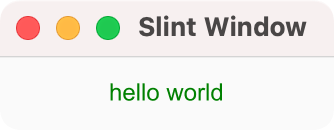
Section titled “Run the application”Run the example with cargo run and a window appears with the green “Hello World” greeting.
Before using the template, you need a C++ compiler that supports C++ 20 and to install CMake ↗ 3.21 or newer.
- Download and extract the ZIP archive ↗ of the C++ Template ↗.
- Rename the extracted directory and change into it:
mv slint-cpp-template-main memorycd memoryConfigure the project
Section titled “Configure the project”The CMakeLists.txt uses the line add_executable(my_application src/main.cpp) to set src/main.cpp as the main C++ code file.
Replace the content of src/main.cpp with the following:
#include "app-window.h" // generated header from ui/app-window.slint
int main(int argc, char **argv){ auto main_window = MainWindow::create(); main_window->run();}Also in CMakeLists.txt the line
slint_target_sources(my_application ui/app-window.slint) is a Slint function used to
add the app-window.slint file to the target.
Replace the contents of ui/app-window.slint with the following:
// ui/appwindow.slintexport component MainWindow inherits Window { Text { text: "hello world"; color: green; }Configure with CMake:
cmake -B buildBuild with CMake:
cmake --build buildRun the application
Section titled “Run the application”Run the application binary on Linux or macOS:
./build/my_applicationOr on Windows:
build\my_application.exeThis opens a window with a green “Hello World” greeting.
If you are stepping through this tutorial on a Windows machine, you can run the application at each step with:
my_application- Download and extract the ZIP archive ↗ of the Node.js Template ↗.
- Rename the extracted directory and change into it:
mv slint-nodejs-template-main memorycd memory- Install dependencies with npm:
npm installConfigure the project
Section titled “Configure the project”The package.json file references src/main.js as the entry point for the application and src/main.js references memory.slint as the UI file.
Replace the contents of src/main.js with the following:
import * as slint from "slint-ui";
const ui = slint.loadFile(new URL("./ui/app-window.slint", import.meta.url));const mainWindow = new ui.MainWindow();await mainWindow.run();The slint.loadFile method resolves files from the process’s current working directory, so from the package.json file’s location.
Replace the contents of ui/app-window.slint with the following:
export component MainWindow inherits Window { Text { text: "hello world"; color: green; }}Run the application
Section titled “Run the application”Run the example with npm start and a window appears with the green “Hello World” greeting.
- Download and extract the ZIP archive ↗ of the Python Template ↗.
- Rename the extracted directory and change into it:
mv slint-python-template-main memorycd memory- Install dependencies with uv:
uv syncConfigure the project
Section titled “Configure the project”The entry point for the application is main.py, the UI file is app-window.slint.
Replace the contents of main.py with the following:
import slint

class MainWindow(slint.loader.ui.app_window.MainWindow):    pass

main_window = MainWindow()main_window.show()main_window.run()The slint.loadFile method resolves files from the process’s current working directory, so from the package.json file’s location.
Replace the contents of ui/app-window.slint with the following:
export component MainWindow inherits Window { Text { text: "hello world"; color: green; }}Run the application
Section titled “Run the application”Run the example with uv run main.py and a window appears with the green “Hello World” greeting.
© 2026 SixtyFPS GmbH